Yet another entry in the time-series, object-cache, feed handler world ... Skyler Technology's C3 Database. This is definitely a hot area to be in right now, as Skyler, Vhayu, Streambase, etc all seem to be vying for a piece of the pie.
Skyler has a nice use case for order book management.
©2006 Marc Adler - All Rights Reserved
Tuesday, December 26, 2006


Saturday, December 09, 2006
DevExpress XtraPivotGridSuite
Recommended by a colleague who is very interested in OLAP tools....
How long before Infragistics comes up with something similar?
©2006 Marc Adler - All Rights Reserved
How long before Infragistics comes up with something similar?
©2006 Marc Adler - All Rights Reserved
OLAP/Analysis Services
Had a very interesting presentation from Microsoft on Analysis Services and OLAP.
What are traders and risk managers using OLAP for at your bank?
Any experience using OLAP is a real-time scenario to perform up-to-the-second reporting? Our feeling is that OLAP cannot be used successfully in a real-time environment unless you have very small cubes.
©2006 Marc Adler - All Rights Reserved
Wednesday, December 06, 2006
FPG911
Brilliant quote from a colleague:
If you need time off from work to test-drive a Porsche, just tell your boss that you are investigating hardware acceleration.
©2006 Marc Adler - All Rights Reserved
If you need time off from work to test-drive a Porsche, just tell your boss that you are investigating hardware acceleration.
©2006 Marc Adler - All Rights Reserved
Less Reliance on Vendors
Even though there are a lot of things to be desired about working at Morgan Stanley, I must say that they have got the right idea about lessening their reliance on vendors. Their EIA group has their own XML-based pub/sub message bus (CPS), their own market data infrastructure (Filter), their own .NET client-side framework, and more. What they have done is cut companies like Tibco out of the loop, and are no longer beholden to vendor release cycles, upgrade fees, and huge licensing costs. Morgan owns the source, and has the staff to maintain and enhace their IP. In fact, a friend of mine at Morgan told me that, if they wanted to, Morgan could take CPS and give Tibco a run for their money.
©2006 Marc Adler - All Rights Reserved
©2006 Marc Adler - All Rights Reserved
Sunday, December 03, 2006
CAB, EventBroker, and Wildcards
I will be blogging about the CAB EventBroker soon. But, I think that I like mine (previously published here) better. I would like to see wildcard support in the EventBroker's subscription strings.
In CAB, you can define an event to be published like this:
[EventPublication("event://Trade/Update", PublicationScope.Global)]
public event EventHandler TradeUpdated;
........
public void TradeIsUpdated(Trade trade)
{
if (this.TradeUpdated != null)
{
this.TradeUpdated(this, new InstrumentUpdatedEventArgs(trade));
}
}
In some other module, you can subscribe to an event like this:
[EventSubscription("event://Trade/Update")
public void OnTradeUpdated(object sender, InstrumentUpdatedEventArgs e)
{
}
I need wildcards. I might like to have a function that gets called when any operation happens to a Trade object. So, I would like to see subscription topics like these:
"event://Trade/*"
or
"event://Trade
Both of these would cover the case when any operation happens to a trade. The subscription string would catch the following topic:
event://Trade/Updated
event://Trade/Deleted
event://Trade/Created
I need Tibco-lite as my internal message bus.
©2006 Marc Adler - All Rights Reserved
In CAB, you can define an event to be published like this:
[EventPublication("event://Trade/Update", PublicationScope.Global)]
public event EventHandler
........
public void TradeIsUpdated(Trade trade)
{
if (this.TradeUpdated != null)
{
this.TradeUpdated(this, new InstrumentUpdatedEventArgs(trade));
}
}
In some other module, you can subscribe to an event like this:
[EventSubscription("event://Trade/Update")
public void OnTradeUpdated(object sender, InstrumentUpdatedEventArgs e)
{
}
I need wildcards. I might like to have a function that gets called when any operation happens to a Trade object. So, I would like to see subscription topics like these:
"event://Trade/*"
or
"event://Trade
Both of these would cover the case when any operation happens to a trade. The subscription string would catch the following topic:
event://Trade/Updated
event://Trade/Deleted
event://Trade/Created
I need Tibco-lite as my internal message bus.
©2006 Marc Adler - All Rights Reserved
Saturday, December 02, 2006
CAB and Status Bars?
I have not gotten into the Smart Client Factory yet (preferring to learn the underlying CAB framework), so this question might be answered by the SCSF .... but has anyone made a UIExtensionSite for a statusbar object yet?
©2006 Marc Adler - All Rights Reserved
©2006 Marc Adler - All Rights Reserved
Grid Computing and UBS
Grid computing webcast here, featuring people from UBS, Microsoft and Digipede.
Our head quant tells us that UBS has an internal website that can price exotics amazingly fast. Something that all of us can strive for...
©2006 Marc Adler - All Rights Reserved
Our head quant tells us that UBS has an internal website that can price exotics amazingly fast. Something that all of us can strive for...
©2006 Marc Adler - All Rights Reserved
Thursday, November 30, 2006
CAB and WorkItems
WorkItems
A WorkItem is considered to represent a “use case” in CAB terminology. Ignore this. It is really just a container of other kinds of objects along with some state information.
A CAB application has a tree of WorkItems. The main CabApplication class contains a reference to the root WorkItem, which is referred to by the RootWorkItem property. Given a WorkItem, you can go up one level to its ParentWorkItem, or down to the next level by accessing the workItem.WorkItems collection.
Recall that the main application class is defined like this:
class CABQuoteViewerApplication : FormShellApplication
The first argument in the generic’s argument list is the type of WorkItem that will be the RootWorkItem of our entire application. All other WorkItems will be descendants of this RootWorkItem. A WorkItem has access to any of its descendant’s properties; however, sibling WorkItems cannot access eachother’s properties directly.
A WorkItem also contains various other collections. It has collections of:
You can Activate/Deactivate a WorkItem, Terminate it, and persist it (Save and Load).
There is a virtual function called OnRunStarted() that you can override in order to create views, read data, etc.
WorkItemExtensions
A WorkItemExtension is a way of extending the behavior of a WorkItem without having to change the WorkItem’s code nor resorting to subclassing the WorkItem. It is a class that just receives certain events that happen to the associated WorkItem. These events are:
Initialized
RunStarted
Activated
Deactivated
Terminated
To extend a WorkItem, you need to create a new subclass of WorkItemExtension. Then you need to create an object of that class; this object is associated with an underlying WorkItem. Then you just handle certain events that happen to the WorkItem.
And, to use this new WorkItemExtension, you would do the following:
©2006 Marc Adler - All Rights Reserved
A WorkItem is considered to represent a “use case” in CAB terminology. Ignore this. It is really just a container of other kinds of objects along with some state information.
A CAB application has a tree of WorkItems. The main CabApplication class contains a reference to the root WorkItem, which is referred to by the RootWorkItem property. Given a WorkItem, you can go up one level to its ParentWorkItem, or down to the next level by accessing the workItem.WorkItems collection.
Recall that the main application class is defined like this:
class CABQuoteViewerApplication : FormShellApplication
The first argument in the generic’s argument list is the type of WorkItem that will be the RootWorkItem of our entire application. All other WorkItems will be descendants of this RootWorkItem. A WorkItem has access to any of its descendant’s properties; however, sibling WorkItems cannot access eachother’s properties directly.
A WorkItem also contains various other collections. It has collections of:
- Workspaces
- SmartParts
- Commands
- EventTopics
- Services
- Items (you can stick any object in this collection, including state, views, etc)
You can Activate/Deactivate a WorkItem, Terminate it, and persist it (Save and Load).
There is a virtual function called OnRunStarted() that you can override in order to create views, read data, etc.
WorkItemExtensions
A WorkItemExtension is a way of extending the behavior of a WorkItem without having to change the WorkItem’s code nor resorting to subclassing the WorkItem. It is a class that just receives certain events that happen to the associated WorkItem. These events are:
Initialized
RunStarted
Activated
Deactivated
Terminated
To extend a WorkItem, you need to create a new subclass of WorkItemExtension. Then you need to create an object of that class; this object is associated with an underlying WorkItem. Then you just handle certain events that happen to the WorkItem.
public class QuoteViewWorkItemExtension : WorkItemExtension
{
  public QuoteViewWorkItemExtension() {}

  protected override OnActivated()
  {
    PerformanceTimer.StartPerformanceTiming();
  }

  protected override OnDeactivated()
  {
    PerformanceTimer.StopPerformanceTiming();
  }
}
And, to use this new WorkItemExtension, you would do the following:
QuoteViewWorkItemExtension wix = new QuoteViewWorkItemExtension();
Wix.Initialize(myWorkItem);
©2006 Marc Adler - All Rights Reserved
CAB and Workspaces
Workspaces
You might be familiar with various kinds of layout managers that automatically arrange the windows that the manager contains. If you are a Java developer, you might be used to layout managers like the FlowLayout manager and the GridLayout manager. The layout manager works in conjunction with a container. The container holds the controls, and the layout manager positions and sizes the controls as they are added to the container.
In CAB, we have Workspaces and SmartParts. A Workspace is a container for holding SmartParts. A WorkItem contains a list of zero or more Workspaces, so you can have workspaces within workspaces.
Most CAB applications will need to create a root Workspace within the main form.
The different kinds of Workspaces in CAB are:
There are two ways of adding zones. One is to use the Visual Studio .Net designer, and drag a workspace from the Toolbox onto a form.

The other way is to dynamically create the workspace in the FormShellApplication’s AfterShellCreate() override.
Here is an example of creating various types of workspaces using the second method (the code is “unwound” for the sake of this article):
When you add a SmartPart to a Workspace, you can pass along hints that tell the Workspace how to layout and decorate the SmartPart. The Workspace class has functions for
You might be familiar with various kinds of layout managers that automatically arrange the windows that the manager contains. If you are a Java developer, you might be used to layout managers like the FlowLayout manager and the GridLayout manager. The layout manager works in conjunction with a container. The container holds the controls, and the layout manager positions and sizes the controls as they are added to the container.
In CAB, we have Workspaces and SmartParts. A Workspace is a container for holding SmartParts. A WorkItem contains a list of zero or more Workspaces, so you can have workspaces within workspaces.
Most CAB applications will need to create a root Workspace within the main form.
The different kinds of Workspaces in CAB are:
- WindowWorkspace
Vanilla area for holding SmartParts
For an MdiWorkspace, will automatically create a Form to hold a SmartPart - DeckWorkspace
Stacks SmartParts in an overlapping manner - MdiWorkspace
Regular MDI container, derives from WindowWorkspace - TabWorkspace
Tabbed Windows - ZoneWorkspace
Allows tiling of window areas, good for implementing an Outlook type layout
There are two ways of adding zones. One is to use the Visual Studio .Net designer, and drag a workspace from the Toolbox onto a form.

The other way is to dynamically create the workspace in the FormShellApplication’s AfterShellCreate() override.
Here is an example of creating various types of workspaces using the second method (the code is “unwound” for the sake of this article):
using System;
using System.Windows.Forms;
using CABQuoteViewer.WorkItems;
using Microsoft.Practices.CompositeUI.SmartParts;
using Microsoft.Practices.CompositeUI.WinForms;

namespace CABQuoteViewer
{
    class CABQuoteViewerApplication : FormShellApplication<QuoteViewerWorkItem, MainForm>
    {
        private IWorkspace m_workspace;
        private QuoteViewerWorkItemExtension m_quoteWorkItemExt;

        /// <summary>
        /// The main entry point for the application.
        /// </summary>
        [STAThread]
        static void Main()
        {
            new CABQuoteViewerApplication().Run();
        }

        protected override void BeforeShellCreated()
        {
            base.BeforeShellCreated();

            if (this.RootWorkItem != null)
            {
                this.m_quoteWorkItemExt = new QuoteViewerWorkItemExtension();
                this.m_quoteWorkItemExt.Initialize(this.RootWorkItem);
            }
        }

        protected override void AfterShellCreated()
        {
            base.AfterShellCreated();
            this.CreateWorkspace("Deck");
        }

        private void CreateWorkspace(string wsTypeName)
        {
            if (wsTypeName == "Mdi")
            {
                this.m_workspace = new MdiWorkspace(this.Shell);
                this.RootWorkItem.Workspaces.Add(this.m_workspace, "ClientWorkspace");
            }
            else if (wsTypeName == "Tab")
            {
                this.m_workspace = this.RootWorkItem.Workspaces.AddNew<TabWorkspace>("ClientWorkspace");

                TabWorkspace tabWorkspace = this.m_workspace as TabWorkspace;
                tabWorkspace.Dock = DockStyle.Fill;
                this.Shell.Controls.Add(tabWorkspace);
            }
            else if (wsTypeName == "Deck")
            {
                this.m_workspace = this.RootWorkItem.Workspaces.AddNew<DeckWorkspace>("ClientWorkspace");

                DeckWorkspace deckWorkspace = this.m_workspace as DeckWorkspace;
                deckWorkspace.Dock = DockStyle.Fill;
                this.Shell.Controls.Add(deckWorkspace);
            }
            else if (wsTypeName == "Zone")
            {
                this.m_workspace = this.RootWorkItem.Workspaces.AddNew<ZoneWorkspace>("ClientWorkspace");

                ZoneWorkspace zoneWorkspace = this.m_workspace as ZoneWorkspace;
                zoneWorkspace.Dock = DockStyle.Fill;
                this.Shell.Controls.Add(zoneWorkspace);
            }
            else
            {
                throw new Exception("Cannot create workspace");
            }
        }
    }
}
When you add a SmartPart to a Workspace, you can pass along hints that tell the Workspace how to layout and decorate the SmartPart. The Workspace class has functions for
- Showing a SmartPart (which also adds the SmartPart to the Workspace as well)
- Hiding a SmartPart
- Activating a SmartPart
- Closing a SmartPart
There are events that get fired when a SmartPart is activated within a Workspace, and when a SmartPart is closing within a Workspace.
You can create new, custom workspaces in CAB, and a later article will cover this.
©2006 Marc Adler - All Rights Reserved
The CAB Application Class Hierarchy
CAB Application Classes
The hierarchy of the CABApplication classes is shown in the diagram below. The top three classes should never be derived from. In almost all classes, your WinForms-based application will derive from FormShellApplication.

A CAB Application will be driven by the base CabApplication class. This class does most of the work to get the CAB application started.
The only field that the CabApplication class has is the root WorkItem, which as the name implies, is the root node of the entire application’s WorkItem tree. I will discuss WorkItems later.
The constructor of CabApplication does nothing; it is the Run() method (which is called by your application’s Main() function) that bootstraps the entire application. The Run() method will do the following:
The Derived Application Classes
The CabShellApplication class extends the CabApplication by
The FormShellApplication class merely overrides the Start() method and calls the familiar WinForms method Application.Run(mainform).
©2006 Marc Adler - All Rights Reserved
The hierarchy of the CABApplication classes is shown in the diagram below. The top three classes should never be derived from. In almost all classes, your WinForms-based application will derive from FormShellApplication.

A CAB Application will be driven by the base CabApplication class. This class does most of the work to get the CAB application started.
The only field that the CabApplication class has is the root WorkItem, which as the name implies, is the root node of the entire application’s WorkItem tree. I will discuss WorkItems later.
The constructor of CabApplication does nothing; it is the Run() method (which is called by your application’s Main() function) that bootstraps the entire application. The Run() method will do the following:
- Create the pre-defined services
- Authenticate the user.
- Reads the config file (ProfileCatalog.xml) that contains a list all of the plug-in modules that the app wants to load.
Each module can have an optional list of Roles. The module will be loaded only if the current user belongs to that role. If a module has no role information associated with it, then the module will be loaded. - Creates the Shell (ie: the MainForm)
- Loads all of the modules that are permitted to be loaded.
In each class in the module that derived from the ModuleInit class, all fields that are tagged with the [ServiceDependency] attribute are created.
All classes tagged with the [Service] attribute are added to the application’s list of services. - RootWorkItem.Run() is called for the applications root WorkItem.
- In the FormShellApplication class, the WinForm’s method Application.Run() is called to start the WinForm app.
The Derived Application Classes
The CabShellApplication class extends the CabApplication by
- Keeping a reference to the Shell (our MainForm) by adding it to the RootWorkItem’s list of items.
- Adding BeforeShellCreated and AfterShellCreated virtual methods. These methods can be overridden in your application class.
- Using a WindowsForm Visualizer
- Adding some UI and command-routine services
The FormShellApplication class merely overrides the Start() method and calls the familiar WinForms method Application.Run(mainform).
©2006 Marc Adler - All Rights Reserved
A Minimal CAB Application
First CAB Application
1) Create a new Windows Form Application solution named CABQuoteViewer.
a. Change the name of the form to MainForm.
2) Add the existing CAB projects to the solution.
a. Browse to C:\Program Files\Microsoft Composite UI App Block\CSharp\Source
b. Add the existing projects for ObjectBuilder, CompositeUI, and CompositeUI.WinForms.
c. In the CABQuoteViewer project, add references to the above 3 projects.
3) Rename the file Program.cs to CABQuoteViewerApplication.cs
4) In the file CABQuoteViewerApplication.cs,
a. Add references to the CAB namespace
using Microsoft.Practices.CompositeUI;
using Microsoft.Practices.CompositeUI.WinForms;
b. Change the definition of the class from
static class Program
to
class QuoteViewerApplication : FormShellApplication
c. The body of the Main() function should just be
new QuoteViewerApplication().Run();
The final version of CABQuoteViewerApplication.cs is:
using System;
using Microsoft.Practices.CompositeUI;
using Microsoft.Practices.CompositeUI.WinForms;
namespace CABQuoteViewer
{
class CABQuoteViewerApplication : FormShellApplication
{
[STAThread]
static void Main()
{
new CABQuoteViewerApplication().Run();
}
}
}
After compiling and running this application, you will see the empty MainForm appear.
©2006 Marc Adler - All Rights Reserved
Tuesday, November 28, 2006
Getting Started with CAB
It looks like, for various reasons that shall accompany me to the grave, we will be bootstrapping the "top part" of our client-side framework with Microsoft's Composite Application Block. I am excited to finally be given the chance to learn CAB, and to lead the team doing the new client-side framework for my investment bank.
I will try to document my learning process with CAB so that I can save my successors some pain.
Installation of CAB and Accessories
Download and install the following files in order (make sure to install GAX before installing GAT):
1) Download Composite Application Block for C# (CAB)
2) Download Enterprise Library 2006 (EntLib)
3) Download the Guidance Automation Extensions (GAX)
4) Download the Guidance Automation Toolkit (GAT)
(At this point, before installing the Smart Client Software Factory, you must build CAB using the CompositeUI.sln solution file located in the directory C:\Program Files\Microsoft Composite UI App Block\CSharp. You must also close Visual Studio before installing SCSF.)
5) Download the Smart Client Software Factory (June 2006 version) (SCSF)
6) Download the CAB Hands-on Lab
7) Download the Intro to CAB document and the CAB help files (you might want to create shortcuts on the desktop for these files.)
8) Download the Sample Visualizations
If you have problems uninstalling GAX or GAT, read this.
Resources
· The CAB home on Microsoft Patterns and Practices area on GotDotNet
· CabPedia
· MSDN Magazine Article
· Getting Started with CAB on the Fear and Loathing blog
· Understanding CAB series on Szymon’s blog
Class Hierarchy
Here is a diagram of the major classes in CAB:
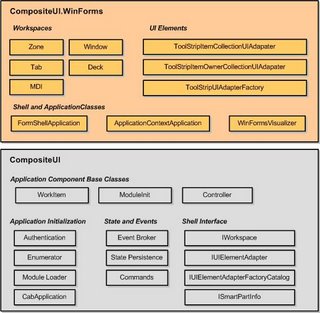
©2006 Marc Adler - All Rights Reserved
I will try to document my learning process with CAB so that I can save my successors some pain.
Installation of CAB and Accessories
Download and install the following files in order (make sure to install GAX before installing GAT):
1) Download Composite Application Block for C# (CAB)
2) Download Enterprise Library 2006 (EntLib)
3) Download the Guidance Automation Extensions (GAX)
4) Download the Guidance Automation Toolkit (GAT)
(At this point, before installing the Smart Client Software Factory, you must build CAB using the CompositeUI.sln solution file located in the directory C:\Program Files\Microsoft Composite UI App Block\CSharp. You must also close Visual Studio before installing SCSF.)
5) Download the Smart Client Software Factory (June 2006 version) (SCSF)
6) Download the CAB Hands-on Lab
7) Download the Intro to CAB document and the CAB help files (you might want to create shortcuts on the desktop for these files.)
8) Download the Sample Visualizations
If you have problems uninstalling GAX or GAT, read this.
Resources
· The CAB home on Microsoft Patterns and Practices area on GotDotNet
· CabPedia
· MSDN Magazine Article
· Getting Started with CAB on the Fear and Loathing blog
· Understanding CAB series on Szymon’s blog
Class Hierarchy
Here is a diagram of the major classes in CAB:
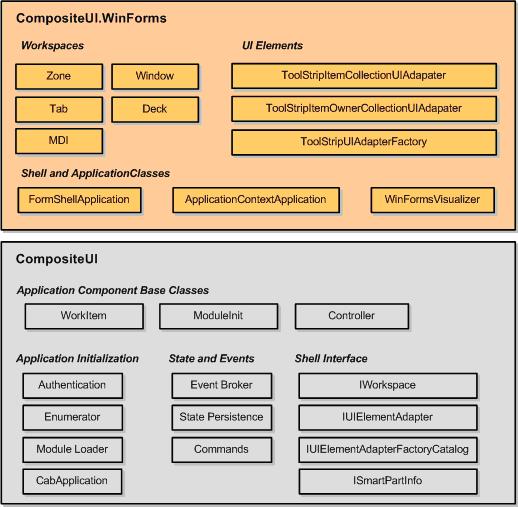
©2006 Marc Adler - All Rights Reserved
Monday, November 27, 2006
Free Market Data
Free ECN real-time data from OpenTick.
Very cheap ($1) monthly fees for some other data.
They have APIs in various languages, including C# for .Net 2.0. This seems like a good way to test that async data handling part of a framework. Here is some example docs for one of their calbacks:
static void onQuote(OTQuote quote)
Description
Provides real-time and historical quotes.
Provides
OTQuote
©2006 Marc Adler - All Rights Reserved
Eclipse Trader
A colleague pointed out the open-source Eclipse Trader, built upon the Eclipse Rich Client Platform (RCP).
There exists people in my company whose number > 1 who would be most pleased if I would fully embrace Eclipse RCP.
©2006 Marc Adler - All Rights Reserved
There exists people in my company whose number > 1 who would be most pleased if I would fully embrace Eclipse RCP.
©2006 Marc Adler - All Rights Reserved
Downloading Yahoo Quotes
Here is a great page for composing URLs to get all sort of delayed quote data from Yahoo
©2006 Marc Adler - All Rights Reserved
©2006 Marc Adler - All Rights Reserved
Saturday, November 25, 2006
Windows Shutdown Crapfest
Via Joel, there is required reading on Microsoft here.
I am currently involved with Microsoft's MCS and DPE in my job. I know that many of the people that I interact with are fervent readers of both Joel and of Mini-Microsoft, and that they will eventually read the above-mentioned article.
What has happened to my beloved Microsoft? Thank the lord that we are engaging some of the most talented Microsoft partners on the planet.
©2006 Marc Adler - All Rights Reserved
Friday, November 24, 2006
Object Cache Considerations (Part 3)
Distribution and Subscriptions
An out-of-process object cache should not only have a storage component, but a messaging system as well. One of the architects in my group, who is a well-known messaging guru, told me that the ideal object cache should have a state-of-the-art messaging system attached to it.
Our object caches should be distributed and subscribable.
A logical cache can be distributed amongst several different servers. We can do this for load balancing and for failover. Applications also have local caches that communicate with the master, distributed cache(s).
Let's say that we are storing information about each position that our company maintains. We might want to have 3 distributed caches, one that stores positions for our customers in the US, one for customers in Europe and the Middle East/Africa, and one for Asia. Upon startup, the master cache loader will read all of the positions from the database and will populate each of the three caches.
This is an example of a very simple load balancer for the distributed caches. Other load balancing schemes include partitioning the positions by the first digit of the position id, a date range, etc.
Each application that uses positions will have its own local cache. These local caches will usually contain a subset of the data that is in the master caches. For example, the US Derivatives Desk might just need to cache positions from US portfolios that have been active in the last 30 days.
When an application updates or deletes a position in one of the master caches, we need to update all of the other master caches that we are using for failover purposes, and any other master caches that contain that particular position. Similarly, when we create a new position, we need to propagate that new position to any redundant caches or any caches that might be interested in the new position.
We might need to push the new or updated position to any of the local caches that are interested in that position. We have a choice of architecture for distributing updates to local caches.
1) We do not distribute the updated object at all. An application won’t know that there is new data in the master cache until it retrieves that object again.
2) We push the update to the local caches right away. We can push out full objects or just the deltas (changes to the object).
There are disadvantages of both schemes. Under scheme (1), the application could be working with old data. Under scheme (2), we could be updating an object in the local cache while the application is working on that same object. Also, under scheme (2), we now have to worry about messaging more.
The master caches have to have some way of communicating with the local caches. We can communicate with each application by one of the familiar messaging mechanisms; Tibco EMS, Tibco RV, LBM, Sockets, etc.
We need to make sure that the messaging is reliable. Each subscriber must receive the update of the object from the master cache. There is no tolerance for dropped messages. Otherwise, different applications might be working with different versions of an object.
We do not have to make the message durable. In other words, if a client goes offline for a while, then the messaging part of the cache does not have to save the update until a time where that client decided to reconnect. So, this saves us the need of storing out-of-date messages.
Using a JMS-based messaging scheme also means that we can use JMS Selectors to filter out objects that an application is not interested in. Selectors have overhead with them, but it is easy to set up a filter-based pub/sub mechanism between the master caches and any local caches. For example, one application might only be interested in updates to position objects whose position id starts with the prefix “A23”. It is easy to set up a JMS selector that has the pattern “positioned LIKE ‘A23%’”.
©2006 Marc Adler - All Rights Reserved
Subscribe to:
Posts (Atom)
